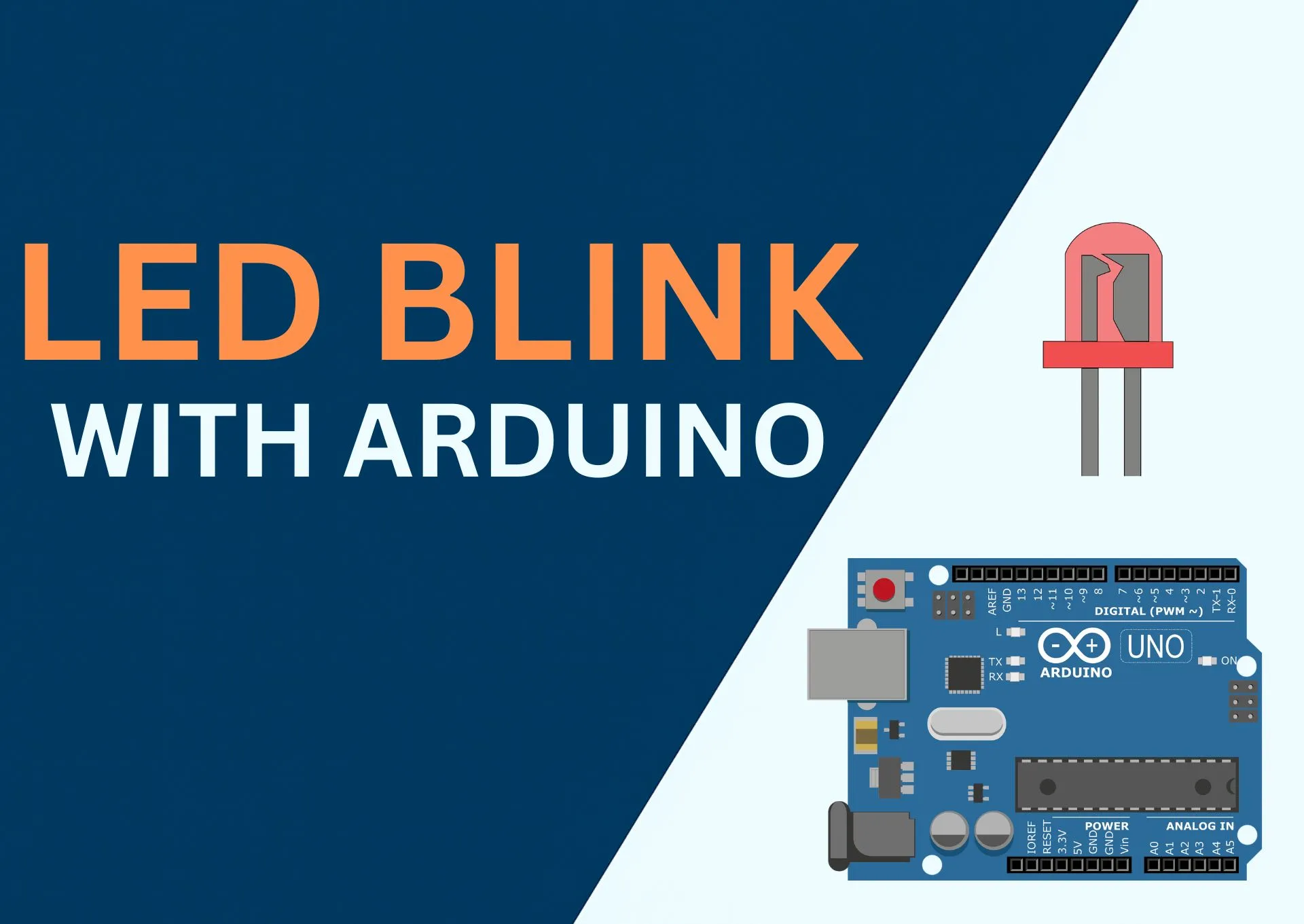
LED BLINK
Introduction
In this tutorial, you’ll make a real LED blink using Arduino UNO or ESP32 in under 5 minutes.
This is the classic first project that teaches how software controls real hardware using digital output pins.
What you’ll learn
- How digital output pins work
- How to safely connect an LED
- What
pinMode()anddigitalWrite()actually do - How changing delays affects hardware behavior
Components Needed
| Component | Quantity | Purpose |
|---|---|---|
| Arduino UNO or ESP32 | 1 | Runs the program |
| LED | 1 | Visual output |
| Resistor (220Ω) | 1 | Protects the LED from damage |
| Breadboard | 1 | Easy wiring without soldering |
| Jumper Wires | 3–4 | Connects everything |
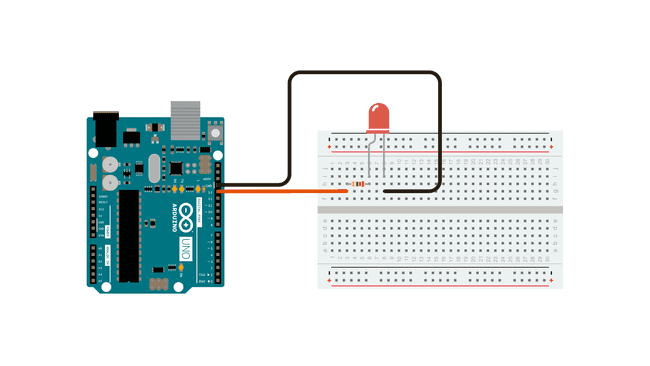
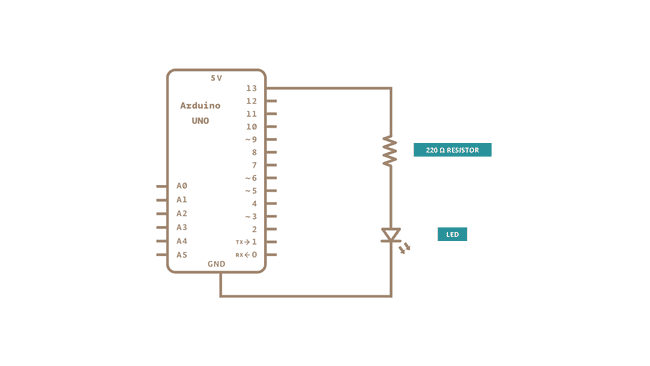
Circuit & Schematic
The circuit diagram shows physical connections.
The schematic shows how electricity flows.
Wiring Instructions
- Insert the LED into the breadboard
- Connect a 220Ω resistor to the long leg (anode) of the LED
- Connect the other end of the resistor to digital pin 13
- Connect the short leg (cathode) of the LED to GND
- Plug your Arduino or ESP32 into your computer using USB
⚠️ Important
- If the LED is reversed, it won’t light up (this is safe)
- Never connect an LED directly to a pin without a resistor
Arduino Code
This program turns the LED ON for 1 second and OFF for 1 second, repeatedly.
arduino-led-blink.ino
#include <Adafruit_GFX.h>
#include <Adafruit_SSD1306.h>

#define SCREEN_WIDTH 128
#define SCREEN_HEIGHT 64
#define OLED_RESET -1
Adafruit_SSD1306 display(SCREEN_WIDTH, SCREEN_HEIGHT, &Wire, OLED_RESET);

// ================= JOYSTICK =================
const int joyX = A0;
const int joyY = A1;
const int joyBtn = 2;

// ================= SNAKE ====================
const int gridSize = 4;
const int maxLength = 100;

int snakeX[maxLength], snakeY[maxLength];
int length = 3;

int dirX = 1, dirY = 0;
int nextDirX = 1, nextDirY = 0;

int foodX, foodY;

unsigned long lastMove = 0;
int speed = 150;

int score = 0;
bool gameRunning = true;

// ============== LONG PRESS ==================
unsigned long upPressedTime = 0;
bool upHeld = false;

unsigned long downPressedTime = 0;
bool downHeld = false;

const unsigned long holdDuration = 1500;

// ===========================================

void setup() {
  pinMode(joyBtn, INPUT_PULLUP);

  display.begin(SSD1306_SWITCHCAPVCC, 0x3C);
  display.clearDisplay();
  display.display();

  showStartScreen();
  startGame();
}

void loop() {
  if (gameRunning) {
    handleInput();

    if (millis() - lastMove > speed) {
      lastMove = millis();

      // Apply direction ONCE per move (fix flicker)
      dirX = nextDirX;
      dirY = nextDirY;

      moveSnake();
      drawGame();
    }
  } else {
    showGameOverScreen();

    // Hold joystick button to restart
    if (digitalRead(joyBtn) == LOW) {
      if (!downHeld) {
        downPressedTime = millis();
        downHeld = true;
      } else if (millis() - downPressedTime > holdDuration) {
        startGame();
        gameRunning = true;
      }
    } else {
      downHeld = false;
    }
  }
}

// ===========================================

void showStartScreen() {
  display.clearDisplay();
  display.setTextSize(1);
  display.setTextColor(SSD1306_WHITE);
  display.setCursor(30, 20);
  display.print("Mini Snake");
  display.setCursor(12, 40);
  display.print("Press joystick");
  display.display();

  while (digitalRead(joyBtn) == HIGH) {
    // wait
  }

  delay(300);
}

void startGame() {
  length = 3;
  score = 0;

  dirX = 1;
  dirY = 0;
  nextDirX = 1;
  nextDirY = 0;

  gameRunning = true;

  for (int i = 0; i < length; i++) {
    snakeX[i] = 20 - i * gridSize;
    snakeY[i] = 20;
  }

  spawnFood();
}

// ===========================================

void handleInput() {
  int xVal = analogRead(joyX);
  int yVal = analogRead(joyY);

  const int deadLow = 350;
  const int deadHigh = 650;

  // ----- Direction selection (NO flicker) -----
  if (yVal < deadLow && dirY != 1) {
    nextDirX = 0;
    nextDirY = -1;
  }
  else if (yVal > deadHigh && dirY != -1) {
    nextDirX = 0;
    nextDirY = 1;
  }
  else if (xVal < deadLow && dirX != 1) {
    nextDirX = -1;
    nextDirY = 0;
  }
  else if (xVal > deadHigh && dirX != -1) {
    nextDirX = 1;
    nextDirY = 0;
  }

  // ----- HOLD UP to quit -----
  if (yVal < deadLow) {
    if (!upHeld) {
      upPressedTime = millis();
      upHeld = true;
    } else if (millis() - upPressedTime > holdDuration) {
      gameRunning = false;
    }
  } else {
    upHeld = false;
  }
}

// ===========================================

void moveSnake() {
  for (int i = length - 1; i > 0; i--) {
    snakeX[i] = snakeX[i - 1];
    snakeY[i] = snakeY[i - 1];
  }

  snakeX[0] += dirX * gridSize;
  snakeY[0] += dirY * gridSize;

  // Screen wrap
  if (snakeX[0] < 0) snakeX[0] = SCREEN_WIDTH - gridSize;
  if (snakeX[0] >= SCREEN_WIDTH) snakeX[0] = 0;
  if (snakeY[0] < 0) snakeY[0] = SCREEN_HEIGHT - gridSize;
  if (snakeY[0] >= SCREEN_HEIGHT) snakeY[0] = 0;

  // Self collision
  for (int i = 1; i < length; i++) {
    if (snakeX[0] == snakeX[i] && snakeY[0] == snakeY[i]) {
      length = 3;
      score = 0;
    }
  }

  // Eat food
  if (snakeX[0] == foodX && snakeY[0] == foodY) {
    if (length < maxLength) length++;
    score++;
    spawnFood();
  }
}

// ===========================================

void drawGame() {
  display.clearDisplay();

  // Food
  display.fillRect(foodX, foodY, gridSize, gridSize, SSD1306_WHITE);

  // Snake
  for (int i = 0; i < length; i++) {
    display.fillRect(snakeX[i], snakeY[i], gridSize, gridSize, SSD1306_WHITE);
  }

  // Score
  display.setTextSize(1);
  display.setTextColor(SSD1306_WHITE);
  display.setCursor(84, 0);
  display.print("Score:");
  display.print(score);

  display.display();
}

// ===========================================

void spawnFood() {
  bool valid = false;
  while (!valid) {
    foodX = random(0, SCREEN_WIDTH / gridSize) * gridSize;
    foodY = random(0, SCREEN_HEIGHT / gridSize) * gridSize;
    valid = true;

    for (int i = 0; i < length; i++) {
      if (foodX == snakeX[i] && foodY == snakeY[i]) {
        valid = false;
        break;
      }
    }
  }
}

// ===========================================

void showGameOverScreen() {
  display.clearDisplay();
  display.setTextSize(1);
  display.setTextColor(SSD1306_WHITE);
  display.setCursor(10, 20);
  display.print("Player: Sanele");
  display.setCursor(10, 35);
  display.print("Final Score: ");
  display.print(score);
  display.setCursor(10, 50);
  display.print("Hold BTN restart");
  display.display();
}
How the code works
pinMode(13, OUTPUT)tells the board that pin 13 will control an output devicedigitalWrite(13, HIGH)sends voltage to the LED and turns it ONdelay(1000)pauses the program for 1 second (1000 milliseconds)
Try This
Change the delay value in the code:
delay(200);
- What happens when you make it smaller?
- What happens when you make it larger?
This is how you start learning by experimenting.
Common Problems
- LED not blinking → Check LED direction
- Nothing happens → Verify pin number and wiring
- Board not detected → Try a different USB cable
🚀 What’s Next?
- Blink using a different pin
- Control LED using a button
- Learn smooth fading using PWM
🤖 Tip: Ask the AI assistant to modify this code for PWM or button control.