<?xml version="1.0" encoding="utf-8"?><?xml-stylesheet type="text/xsl" href="atom.xsl"?>
<feed xmlns="http://www.w3.org/2005/Atom">
    <id>https://just-electronic-x.vercel.app/blog/</id>
    <title>JustElectronicX Blog</title>
    <updated>2025-08-26T00:00:00.000Z</updated>
    <generator>https://github.com/jpmonette/feed</generator>
    <link rel="alternate" href="https://just-electronic-x.vercel.app/blog/"/>
    <subtitle>JustElectronicX Blog</subtitle>
    <icon>https://just-electronic-x.vercel.app/img/favicon.ico</icon>
    <entry>
        <title type="html"><![CDATA[Smart Weather Project]]></title>
        <id>https://just-electronic-x.vercel.app/blog/Smart-Weather-Project/</id>
        <link href="https://just-electronic-x.vercel.app/blog/Smart-Weather-Project/"/>
        <updated>2025-08-26T00:00:00.000Z</updated>
        <summary type="html"><![CDATA[I demonstrate how to build a simple Smart Weather Display using an ESP8266, BMP280 sensor, and a 128x32 OLED screen. The project uses I2C communication to read Temperature data from the BMP280 sensor and display it on the OLED.]]></summary>
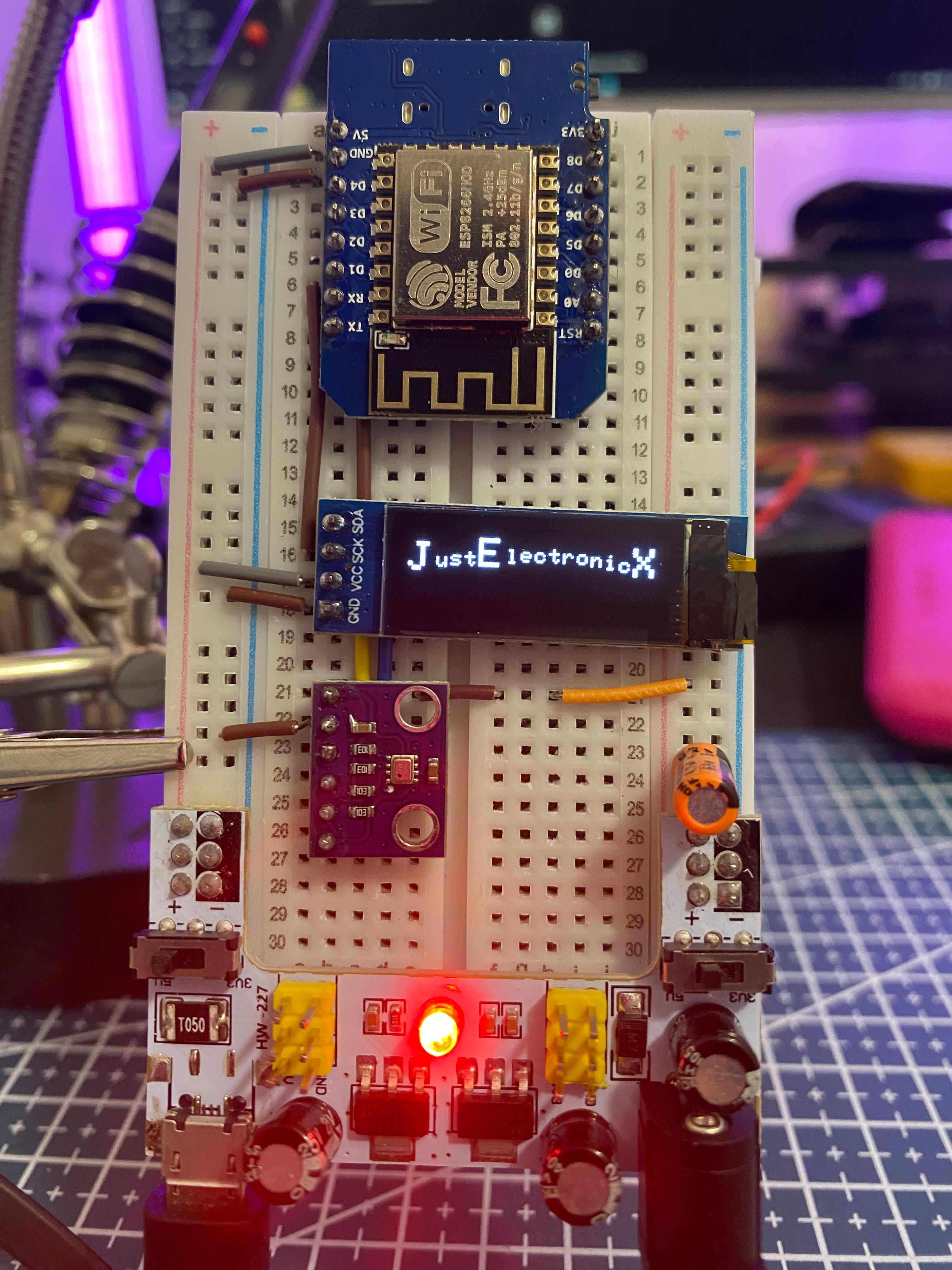
        <content type="html"><![CDATA[<p>I demonstrate how to build a simple Smart Weather Display using an ESP8266, BMP280 sensor, and a 128x32 OLED screen. The project uses I2C communication to read Temperature data from the BMP280 sensor and display it on the OLED.</p>
<!-- -->
<p>You'll see the step-by-step connections, including:</p>
<ul>
<li class="">Wiring the BMP280 sensor and OLED to the ESP8266.</li>
<li class="">Powering the setup using a breadboard power supply.</li>
<li class="">Viewing the live Temperature readings on the OLED screen.</li>
</ul>
<div class="theme-admonition theme-admonition-warning admonition_xJq3 alert alert--warning"><div class="admonitionHeading_Gvgb"><span class="admonitionIcon_Rf37"><svg viewBox="0 0 16 16"><path fill-rule="evenodd" d="M8.893 1.5c-.183-.31-.52-.5-.887-.5s-.703.19-.886.5L.138 13.499a.98.98 0 0 0 0 1.001c.193.31.53.501.886.501h13.964c.367 0 .704-.19.877-.5a1.03 1.03 0 0 0 .01-1.002L8.893 1.5zm.133 11.497H6.987v-2.003h2.039v2.003zm0-3.004H6.987V5.987h2.039v4.006z"></path></svg></span>warning</div><div class="admonitionContent_BuS1"><p><strong>Important:</strong> This version of the BMP280 sensor requires 3.3V, so ensure correct wiring to avoid damage.</p></div></div>
<p>👉 <strong>Watch the Video from</strong> <a href="https://youtube.com/shorts/_0oJk6UgW9k" target="_blank" rel="noopener noreferrer" class="">here</a></p>
<p>👉 <strong>Download the Source Code from</strong> <a href="https://wokwi.com/projects/415643630537631745" target="_blank" rel="noopener noreferrer" class="">here</a></p>
<p>If you enjoyed this project or found it helpful, don't forget to like, comment, and subscribe to my <a href="https://www.youtube.com/@JustElectronicX" target="_blank" rel="noopener noreferrer" class="">YouTube Channel</a>. For more DIY electronics tutorials! 🚀</p>
<p><img decoding="async" loading="lazy" alt="Docusaurus Plushie" src="https://just-electronic-x.vercel.app/assets/images/P1_Weatherstation-908866f89b9f440e0952a0a6aac63a21.jpeg" width="3024" height="4032" class="img_ev3q"></p>
<hr>
<div></div>
<hr>
<h2 class="anchor anchorTargetHideOnScrollNavbar_vjPI" id="comments">Comments<a href="https://just-electronic-x.vercel.app/blog/Smart-Weather-Project/#comments" class="hash-link" aria-label="Direct link to Comments" title="Direct link to Comments" translate="no">​</a></h2>
<div class="commentSection_q0zV"><div class="commentsHeader_VLrf"></div><form class="commentForm_zTbw"><div class="textareaWrapper_L7jf"><textarea aria-label="Write a comment" placeholder="Sign in to write a comment…" required="" rows="5" disabled="" style="resize:vertical"></textarea><button type="button" class="disabledOverlay_ngqX" aria-label="Sign in to comment"></button></div><div class="submitWrapper_z89R"><button type="submit" disabled="">Post Comment</button><button type="button" class="disabledOverlay_ngqX" aria-label="Sign in to comment"></button></div></form><div class="commentsList_MSsY"><div style="display:flex;flex-direction:column;gap:1.5rem;margin-top:1rem"><div style="display:flex;gap:1rem;width:100%"><div class="skeleton_Qe73 circular_zFxq" style="flex-shrink:0;width:45px;height:45px" aria-hidden="true"></div><div style="flex:1;display:flex;flex-direction:column;gap:0.5rem;padding-top:0.2rem"><div class="skeleton_Qe73 text_iMo4" style="width:20%" aria-hidden="true"></div><div class="skeleton_Qe73 text_iMo4" style="width:15%;height:0.8rem" aria-hidden="true"></div><div class="skeleton_Qe73 text_iMo4" style="margin-top:0.5rem;width:100%" aria-hidden="true"></div><div class="skeleton_Qe73 text_iMo4" style="width:85%" aria-hidden="true"></div></div></div><div style="display:flex;gap:1rem;width:100%"><div class="skeleton_Qe73 circular_zFxq" style="flex-shrink:0;width:45px;height:45px" aria-hidden="true"></div><div style="flex:1;display:flex;flex-direction:column;gap:0.5rem;padding-top:0.2rem"><div class="skeleton_Qe73 text_iMo4" style="width:20%" aria-hidden="true"></div><div class="skeleton_Qe73 text_iMo4" style="width:15%;height:0.8rem" aria-hidden="true"></div><div class="skeleton_Qe73 text_iMo4" style="margin-top:0.5rem;width:100%" aria-hidden="true"></div><div class="skeleton_Qe73 text_iMo4" style="width:85%" aria-hidden="true"></div></div></div><div style="display:flex;gap:1rem;width:100%"><div class="skeleton_Qe73 circular_zFxq" style="flex-shrink:0;width:45px;height:45px" aria-hidden="true"></div><div style="flex:1;display:flex;flex-direction:column;gap:0.5rem;padding-top:0.2rem"><div class="skeleton_Qe73 text_iMo4" style="width:20%" aria-hidden="true"></div><div class="skeleton_Qe73 text_iMo4" style="width:15%;height:0.8rem" aria-hidden="true"></div><div class="skeleton_Qe73 text_iMo4" style="margin-top:0.5rem;width:100%" aria-hidden="true"></div><div class="skeleton_Qe73 text_iMo4" style="width:85%" aria-hidden="true"></div></div></div></div></div></div>]]></content>
        <author>
            <name>Dhaivat Joshi</name>
            <uri>https://dhaivatjoshi.github.io/Portfolio/</uri>
        </author>
        <category label="ESP8266" term="ESP8266"/>
        <category label="BMP280" term="BMP280"/>
        <category label="Smart Weather Station" term="Smart Weather Station"/>
    </entry>
</feed>